Hands on — Springboot + Flyway
Before you reading on, be sure that you read the fundamentals about migration scripts in the article Database Migration for Beginners or you have some bits of knowledge about this topic.
Techstack
- Springboot 3.0
- Flyway
- PostgreSQL
First, we need to add the dependencies.
<dependency>
    <groupId>org.flywaydb</groupId>
    <artifactId>flyway-core</artifactId>
    <version>9.8.3</version>
</dependency>

<dependency>
    <groupId>org.postgresql</groupId>
    <artifactId>postgresql</artifactId>
</dependency>

<dependency>
    <groupId>org.springframework.boot</groupId>
    <artifactId>spring-boot-starter-data-jpa</artifactId>
</dependency>

<dependency>
    <groupId>org.springframework.boot</groupId>
    <artifactId>spring-boot-starter-web</artifactId>
</dependency>
Datasource configuration
spring:
  datasource:
    hikari:
      jdbc-url: jdbc:postgresql://localhost:54322/wallet-transaction
      pool-name: wallet-transaction-hikari-pool
      driver-class-name: org.postgresql.Driver
      username: wallet-transaction
      password: wallet-transaction

# application.yml
@EnableJpaRepositories(basePackages = {"com.crypto.coinwallet.andrelucas.dataprovider"})
@Configuration
@EnableTransactionManagement
public class DataSourceConfiguration {

    @Bean
    @ConfigurationProperties(value = "spring.datasource.hikari")
    DataSource dataSource(){
        return DataSourceBuilder.create() // DataSourceBuilder<capture of ?>
            .type(HikariDataSource.class) // DataSourceBuilder<HikariDataSource>
            .build();
    }
}
DataSourceConfiguration.java
For advanced HikariCP pool sizing and performance tuning, see the HikariCP Connection Pooling with PostgreSQL guide.
Flyway configuration
By default, the flyway migration scripts, are in the folder db/migrations
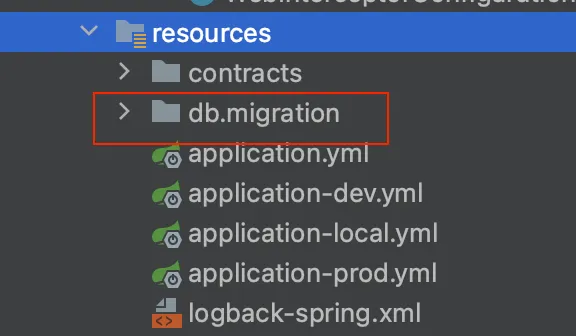
But, if you can change you only need to add this line in the application.yml file
flyway:
  locations: db/migration
Another way is to configure the flyway programmatically
@Bean(name = "managerFlyway")
public Flyway flyway(@Qualifier("clientDataSource") final DataSource dataSource){
    final var configuration = new ClassicConfiguration();
    configuration.setDataSource(dataSource);
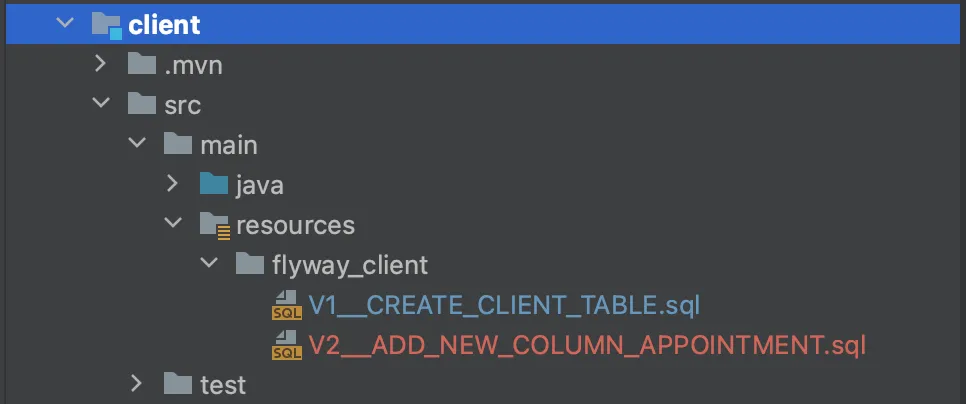
    configuration.setLocations(new Location(descriptor: "classpath:flyway_client"));

    final Flyway flyway = new Flyway(configuration);
    flyway.migrate();

    return flyway;
}
In this case, the flyway bean receives the data source configuration bean, and another path where is the migration scripts.
References
- https://docs.spring.io/spring-data/jpa/docs/current/reference/html/
- https://flywaydb.org/
- https://martinfowler.com/articles/evodb.html